Product Tour

Self storage software screenshots: a tour of Storage Facility Creator

Eight stops through the self-storage management software, in the order you would use it: the dashboard, setting up a facility, tenants, units, autopay, past due, leases and Stripe. Every screenshot is the real app, and every callout is something the app does today.

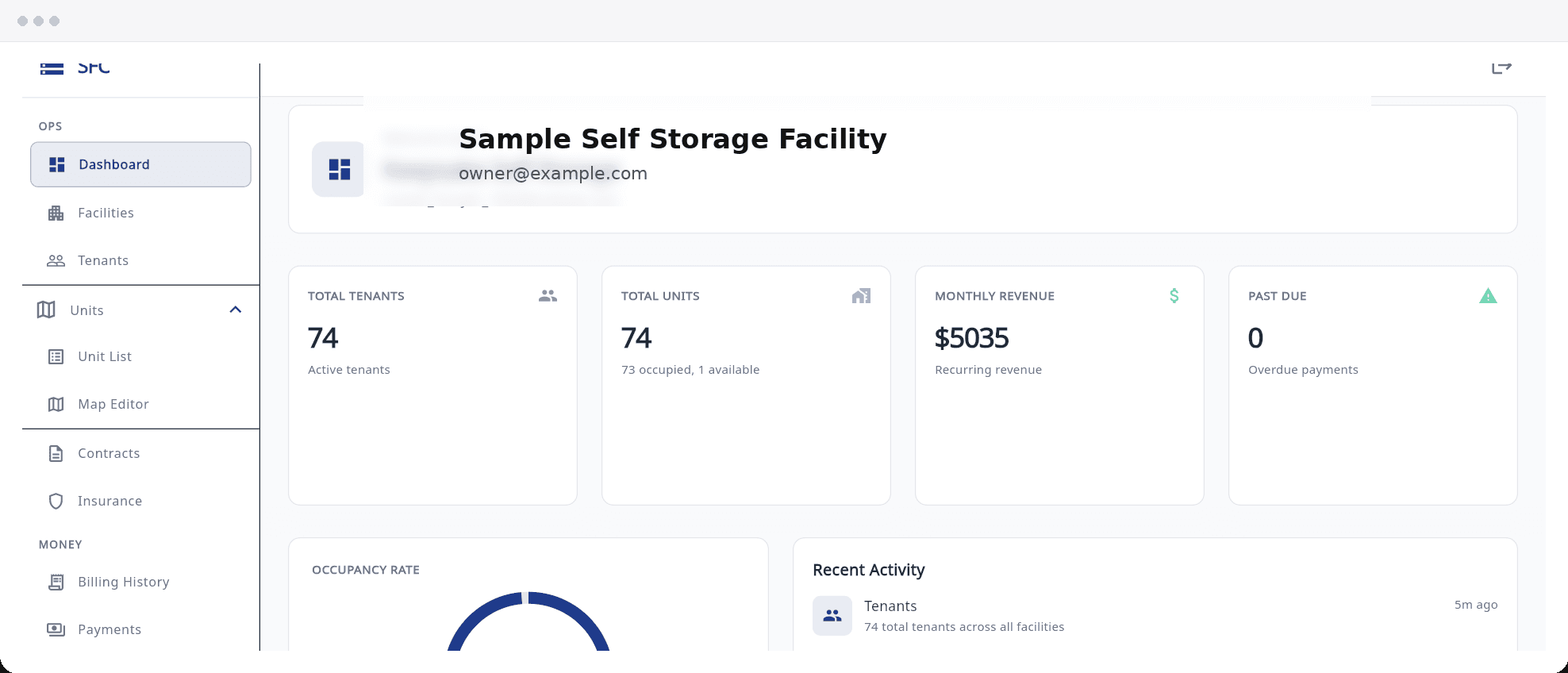
Storage Facility Creator dashboard showing active tenants, occupied and vacant units, monthly recurring revenue and tenants past due
Dashboard cards: active tenants, occupied and vacant units, recurring monthly revenue and tenants behind on rent.
Stop 1 of 8

The dashboard

The first screen after sign-in answers the morning questions: how full are we, what is scheduled to come in this month, and who is behind.

  • Occupancy, recurring revenue and past-due tenants show the moment you sign in, for one facility or all of them.
  • Occupancy and tenant counts are worked out fresh each time you open the dashboard, so there is no report to run first.
  • Switch between facilities, or view them all at once, from one login, and search the tenant list across every facility by name, unit, email or phone.

See the full feature list

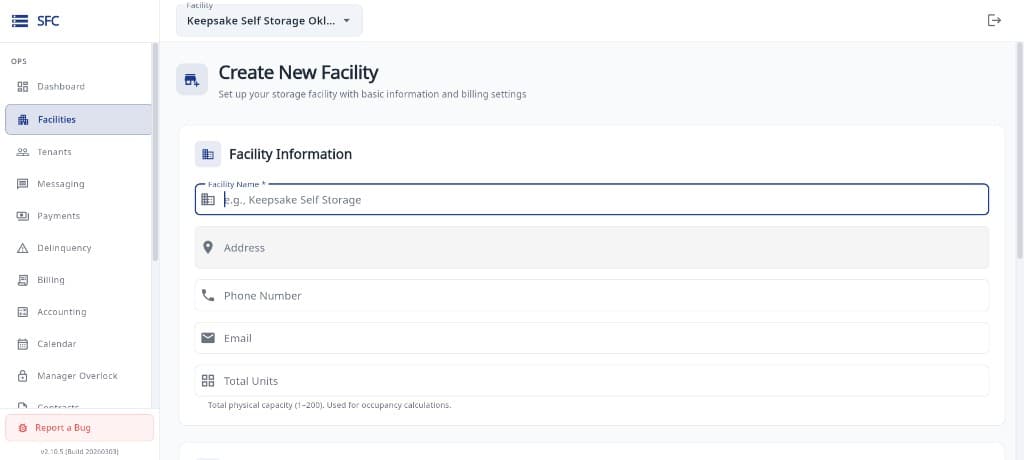
Storage Facility Creator create new facility form with name, address, phone, email and total units fields
Create New Facility: name, address, contact details and total units, with the billing settings further down the same form.
Stop 2 of 8

Setting up a facility

A new facility is a short form, not a project. Name it, add the address and unit count, set the billing rules, and you are ready to add tenants.

  • The wizard creates the facility with its billing rules in a few minutes; grace days, late fees and the default deposit are settings you control per facility.
  • Facility settings also decide what renters see online when you turn on the public rental page.
  • The trial covers one facility; further facilities need a card-backed subscription. A Report a Bug button sits in the sidebar on every screen.

What a facility costs

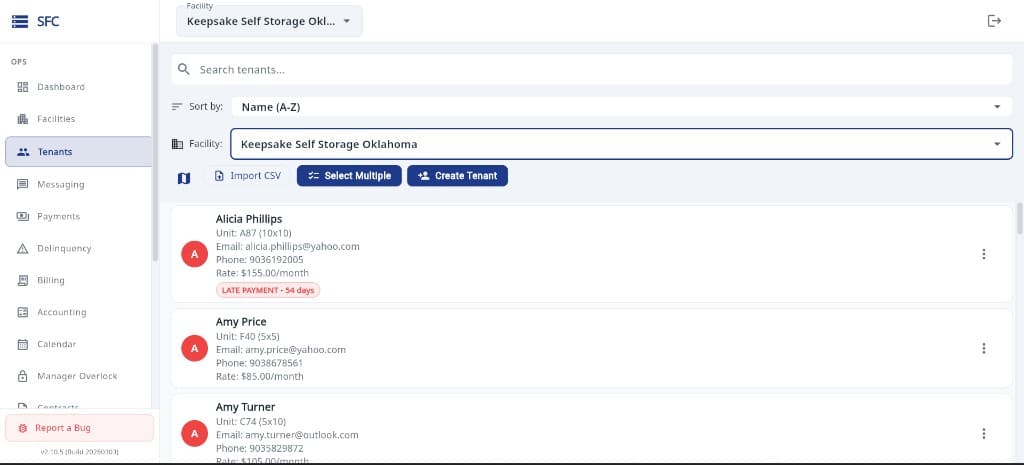
Storage Facility Creator tenant list with search, sort, facility filter, Import CSV, Select Multiple and Create Tenant buttons
Tenants: search and sort, Import CSV, Select Multiple for bulk actions, and Create Tenant. Each row shows unit, email, phone and rate.
Stop 3 of 8

The tenant list

Every renter at the facility in one sortable list, with the bulk actions and the spreadsheet import you need on day one.

  • Find, sort and bulk-manage every tenant from one list; late tenants carry a badge with how many days behind they are.
  • Import your tenant list from a spreadsheet with automatic column matching and duplicate detection, then enter each tenant’s past rent and payments with their real dates so balances start out right.
  • Tenants you add with Create Tenant are checked against your Do Not Rent list before they are saved, and the tenant page keeps contacts, ID, vehicles, balance, gate code, autopay, contracts, insurance and contact history together.

How moving your data works

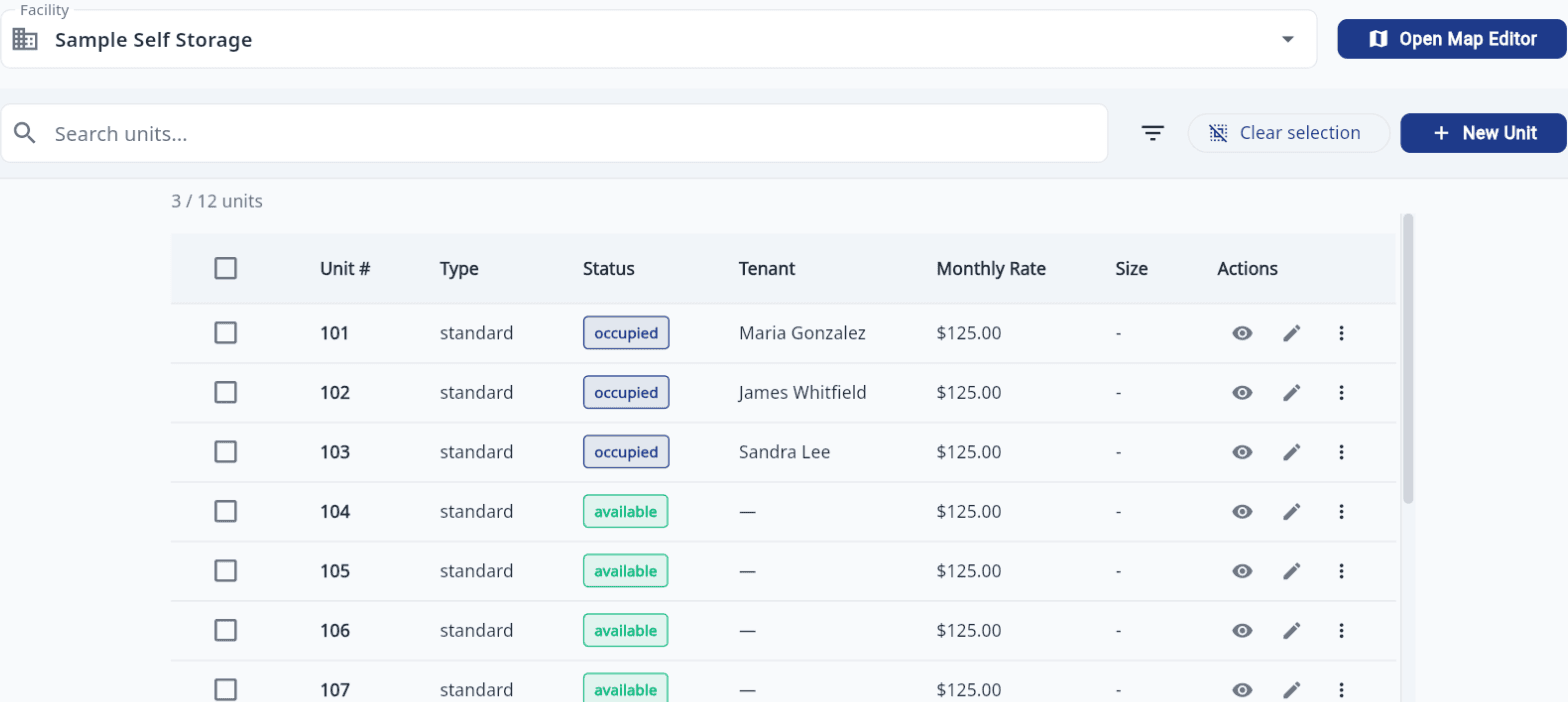
Storage Facility Creator unit list with unit number, type, status, tenant, monthly rate and size columns and an Open Map Editor button
Units: number, type, occupied or available status, tenant, monthly rate and size, with bulk selection, New Unit and Open Map Editor.
Stop 4 of 8

The unit list and site map

Units are rows you can select and change in bulk, and the same data feeds a site map you can color by status and print.

  • See every unit’s status, tenant and rate in one list and update them in bulk.
  • Create a whole row or building of units at once by typing a number range, and group units by building or area even when numbers repeat.
  • Assign, transfer, overlock or move a tenant out straight from the unit, and draw a site map colored by unit status that you can print and publish.

Units, move-ins and transfers

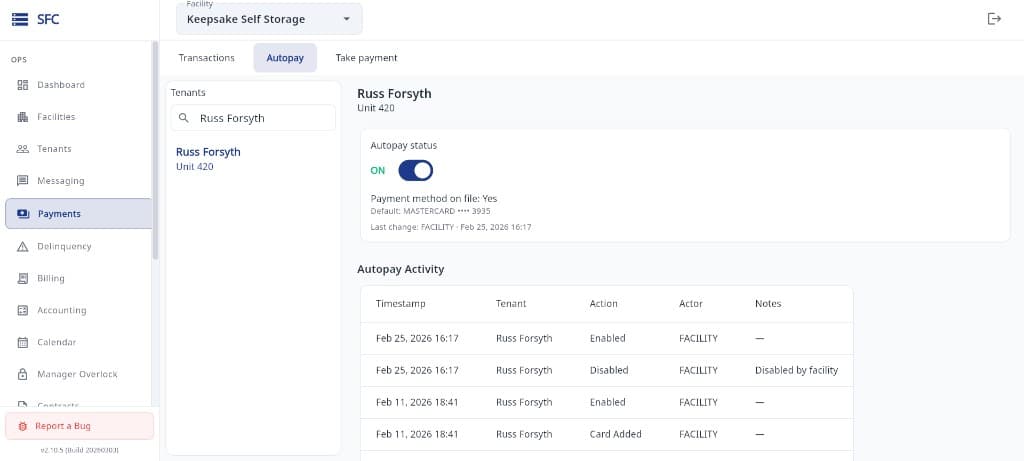
Storage Facility Creator autopay panel with the autopay status switch on, a card on file and an autopay activity log
Payments, Autopay tab: the on/off switch, the card on file, the last change, and an activity log of every enable, disable and card added.
Stop 5 of 8

Autopay controls

Autopay is a switch per tenant backed by a saved card, and every change to it is written down with who made it and when.

  • Tenants or staff can turn on autopay with a saved card; the balance is collected automatically each month and paid to your own Stripe account.
  • Most declined cards are retried a few days later; autopay switches off for a dead or expired card or after repeated failures, and the unpaid balance shows on your past-due list.
  • Every autopay change is logged with who made it and when, and the Take payment tab charges the card on file or takes a new card at the counter with no separate terminal.

Autopay questions answered

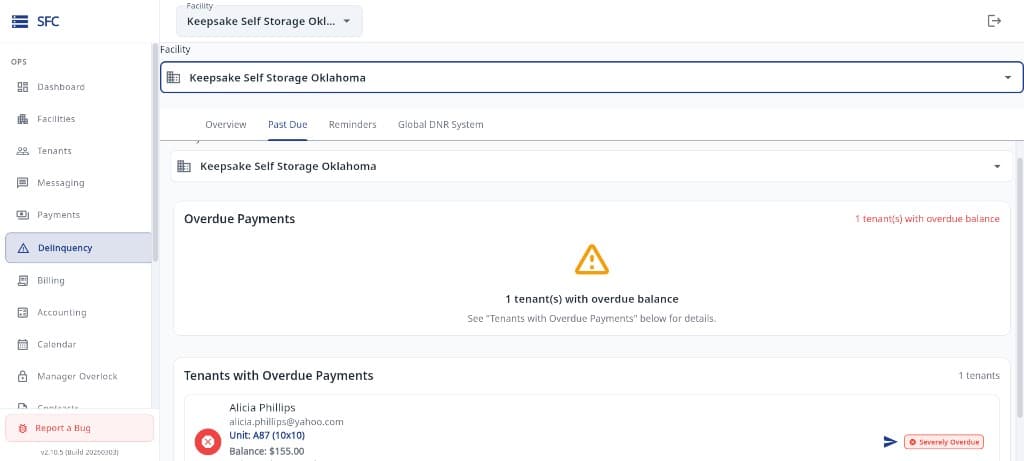
Storage Facility Creator delinquency screen on the Past Due tab showing an overdue payments summary and a list of tenants with overdue balances
Delinquency, Past Due tab: a count of tenants with an overdue balance, then each tenant with unit, balance owed and an overdue severity flag.
Stop 6 of 8

Past due and collections

The past-due view is the list you work from: who is behind, by how much, and the actions to take next.

  • See which tenants are behind on rent, how many days late they are and what they owe, from a single past-due list.
  • Set your own grace period and a flat or percentage late fee per facility; automatic late fees are an opt-in switch and never post more than once a month.
  • Overlock every unit that owes a balance in one action and print the overlocked units with tenant, phone and amount owed, or send a past-due tenant a payment link they can pay by card without logging in.

Guide: handling late tenants

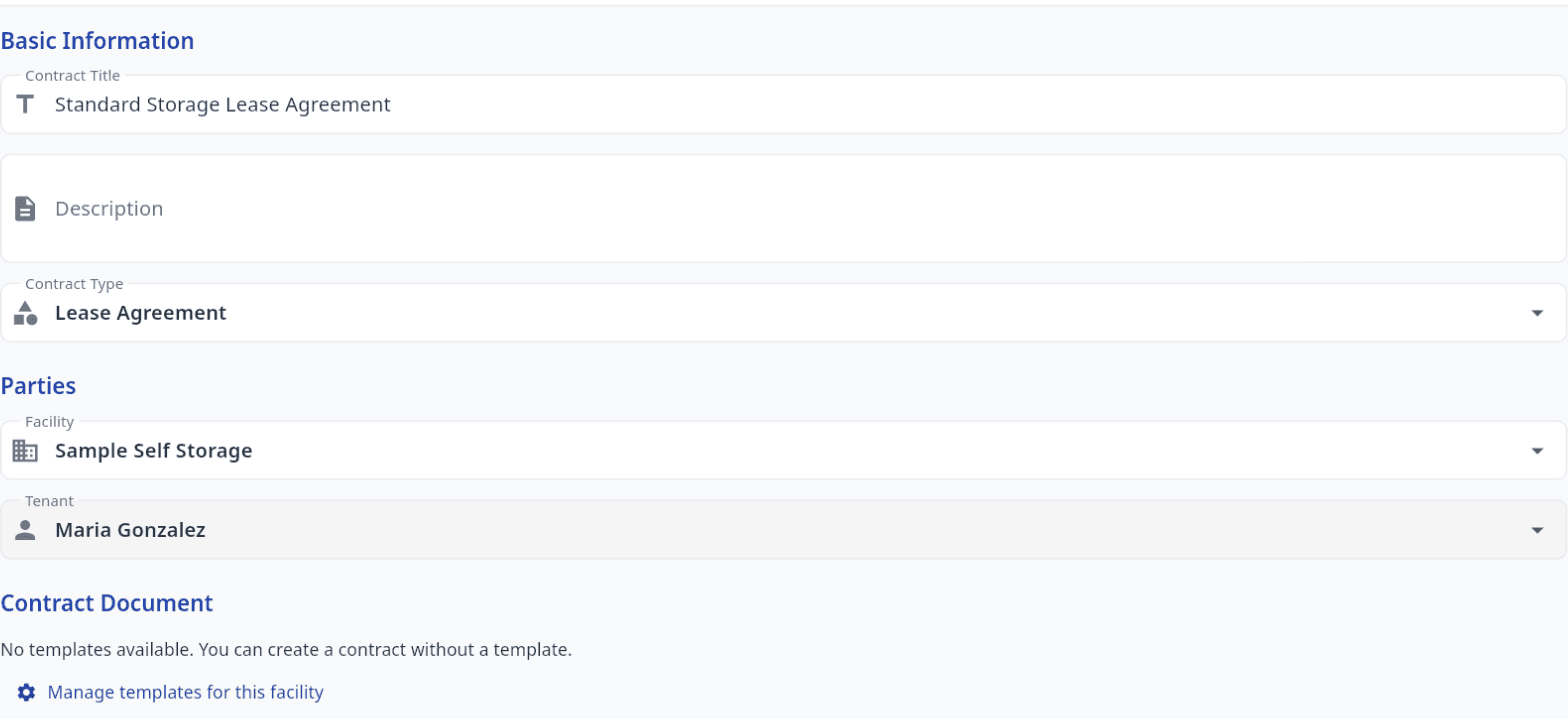
Storage Facility Creator new contract form with contract title, type, facility, tenant and a link to manage templates for this facility
New contract: title, type, the facility and tenant it belongs to, and the document step with a link to manage this facility’s saved templates.
Stop 7 of 8

Contracts and e-signature

Your own lease, signed at the counter and filed on the tenant record. No third-party e-sign subscription.

  • Create a rental agreement from your own PDF or a saved template, or start from an included sample storage, vehicle/RV or addendum agreement. Tap on the PDF to mark where the tenant signs, initials, dates and writes the unit number.
  • Walk-ins sign on the office tablet with Sign in person, and online renters e-sign the standard rental terms as they rent. Neither needs an account.
  • The signature is stamped onto your PDF, the tenant is emailed a link to their copy, and the agreement keeps the signer’s name, email and signing time. Sent and signed agreements stay locked.

Our e-signature disclosure

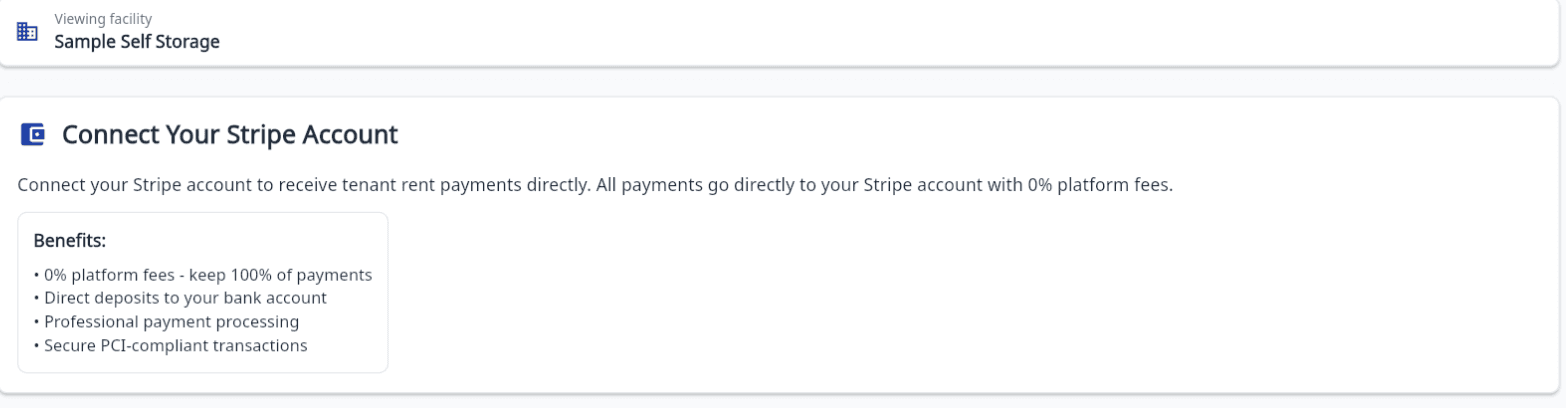
Storage Facility Creator Connect Your Stripe Account screen for a facility, listing the benefits of connecting a Stripe account
Connect Your Stripe Account: each facility links its own Stripe account so tenant card payments go straight to it.
Stop 8 of 8

Connecting Stripe

Card payments run through a Stripe account that belongs to you, connected per facility, so payouts land in your bank without passing through ours.

  • Connect your own Stripe account per facility in a few minutes; card numbers never touch your software.
  • Once connected: a card on file per tenant, phone and counter payments on that card, pay-by-link for any tenant, Pay now in the tenant portal, and monthly autopay.
  • Refund a card payment to the tenant’s card straight from their ledger, and chargebacks show up on the ledger automatically and stay out of autopay until staff resolve them.

Stripe, Twilio and SendGrid details

Not pictured

Also included, beyond these eight screens

The tour stops at the screens that photograph well. These parts of the app do the rest of the work and are covered in detail on the features page.

Texting and email

Text or email a tenant from their record or the Messaging hub, starting from ready-made templates, with two-way replies as conversations. Texts go out on a verified toll-free number; tenants opt in, and STOP, START and HELP are handled automatically. Up to 5,000 emails a month per paid facility (500 during the trial).

The tenant portal

Tenants sign in with their email and an access code, see what they owe, pay by card, save a card and switch autopay on, and keep their phone, emergency contacts and vehicles current. An overdue or overlocked tenant sees the notice in the portal with a Pay now button.

Online rentals and your facility website

Renters browse available units, pick one or let the system assign it, sign and pay online, and the move-in lands in your dashboard as a tenant, a signed agreement PDF, a ledger entry and an access code for your gate controller. The hosted facility website with online rentals is a $25 per facility per month add-on, cancel any time.

Your team

Owner, Manager, Employee and Viewer roles per facility, enforced in the app and on the database, with unlimited users at no extra cost. Two-factor sign-in by emailed code, and a per-facility audit trail of payments, move-ins, move-outs, Do Not Rent and team changes that cannot be edited.

After the tour

Trying it on your own facility

  • Sign up yourself; your trial starts once your account is approved. No card to start.
  • After the trial, $75 per facility per month, month to month, and your first month is free when you subscribe (30-day trial + first month free).
  • Unlimited users and no onboarding fee. Cancel from inside the app and keep access to the end of the billing period.
  • Gate access is codes and schedules per tenant; you enter codes in your own gate controller. There is no gate hardware integration.
  • Support is by email at support@storagefacilitycreator.com and the Report a Bug button inside the app.

Pricing is on the Pricing page, common questions on the FAQ, and if you are weighing vendors, the Compare Options page lays out where this software fits.

Get Started

Want to see these screens with your own units in them?

Start the trial and set up your facility yourself, or book a demo and we will walk through the tour with you.

No onboarding fee. $75 per facility, per month. Built for self-storage operators.